
How to save memory when declaring Strings in Java?

String is a very commonly used type in Java, and it is extremely important to understand how it works. We can easily declare a String, for example:
String name = "Mary";The question is: what happens when we declare a String this way? Because we can also declare it like this:
String name = new String("Mary");In this article, we will look at the difference between each way of creating a String. Which method should we use? It depends on your goal.
How does it work?
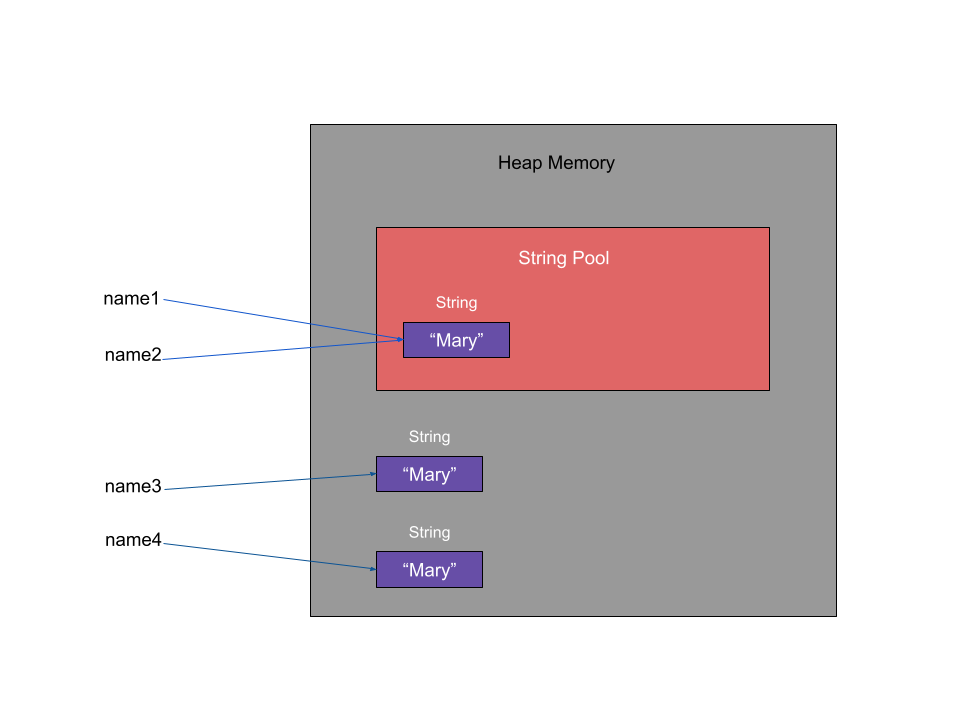
String Literal
The Heap memory stores the value of objects, so whenever we declare a String, the value is stored in this memory.
name1 and name2 share the same value in memory because these variables were declared as follows:
String name1 = "Mary";
String name2 = "Mary";
Since Strings are immutable—meaning that once declared, their value cannot be changed—this doesn’t cause any issues. It helps us save memory space because it’s unnecessary to have the value “Mary” declared twice. Therefore, name1 and name2 share the same memory reference. This is all possible thanks to the String Pool.
When we want to create a String in the String Pool to save memory, it’s necessary declaring it as shown in the example above. Every time a String is declared, its value is checked, and if it already exists, a new object is not created, and the existing one is reused.
String Object
When we use the example below, it means that we are creating two different objects, so two values are allocated in Heap memory, and the variables will have access to two different references.
String name3 = new String("Mary");
String name4 = new String("Mary");
This way, we are consuming more memory.
Examples
class Scratch {
    public static void main(String[] args) {

        String name1 = "Mary";
        String name2 = "Mary";

        boolean isSameReferenceName1AndName2 = name1 == name2;
        boolean isSameValueName1AndName2 = name1.equals(name2);

        System.out.println("Is same reference name1 and name2? " + isSameReferenceName1AndName2 );
        System.out.println("Is same value name1 and name2? " + isSameValueName1AndName2);

        String name3 = new String("Mary");
        String name4 = new String("Mary");

        boolean isSameReferenceName3AndName4 = name3 == name4;
        boolean isSameValueName3AndName4 = name3.equals(name4);

        System.out.println("Is same reference name3 and name4? " + isSameReferenceName3AndName4 );
        System.out.println("Is same value name3 and name4? " + isSameValueName3AndName4);

    }
}
We have the following response.
Is same reference name1 and name2? true
Is same value name1 and name2? true
Is same reference name3 and name4? false
Is same value name3 and name4? true
Conclusion
To save memory, it’s recommended to declare Strings using literals, as it’s the best way to avoid excessive memory consumption. The String Pool is crucial for more efficient memory usage, and we don’t need to worry about changing the value since String is immutable.