
How to send email in Quarkus API?

In modern applications, sending emails is an essential feature — whether for notifications, account confirmation, password recovery, billing alerts…
Quarkus provides a simple and efficient solution for this through the quarkus-mailpit extension, which allows you to send emails in a reactive way and fully integrated with the application ecosystem.
In this post, we will understand how to use the Mailpit extension in a practical way.
“A Quarkus extension that lets you utilize Mailpit as a Dev Service for the Quarkus Mailer enabling zero-config SMTP for testing or running in dev mode. Mailpit acts as an SMTP server, provides a modern web interface to view & test captured emails, and contains an API for automated integration testing.
Using this service has some obvious advantages when running in dev mode including but not limited to:
- Verify e-mail and their content without a real mail server
- Prevent accidentally sending a customer an email while developing
- Use the REST API to verify the contents of actual sent emails instead of mocked messages.
- Chaos testing to assess your system’s resilience against email delivery failures.”
Hands on
We need to include the Mailpit extension.
         <dependency>
            <groupId>io.quarkiverse.mailpit</groupId>
            <artifactId>quarkus-mailpit</artifactId>
            <version>2.0.0</version>
        </dependency>

        <!-- If you want to use test framework to verify emails also -->
        <dependency>
            <groupId>io.quarkiverse.mailpit</groupId>
            <artifactId>quarkus-mailpit-testing</artifactId>
            <version>2.0.0</version>
            <scope>test</scope>
        </dependency>
Next, we create a resource to inject the Mailer and send the email.
import io.quarkus.mailer.Mail;
import io.quarkus.mailer.Mailer;
import jakarta.enterprise.context.ApplicationScoped;
import jakarta.inject.Inject;
import jakarta.ws.rs.GET;
import jakarta.ws.rs.Path;

import java.util.List;

@Path("/superheroes")
@ApplicationScoped
public class SuperheroResource {
    @Inject
    Mailer mailer;

    @GET
    public String villainAlert() {
        Mail m = new Mail();
        m.setFrom("admin@hallofjustice.net");
        m.setTo(List.of("superheroes@quarkus.io"));
        m.setText("Lex Luthor has been seen in Gotham City!");
        m.setSubject("WARNING: Super Villain Alert");
        mailer.send(m);

        return "Superheroes alerted!";
    }
}
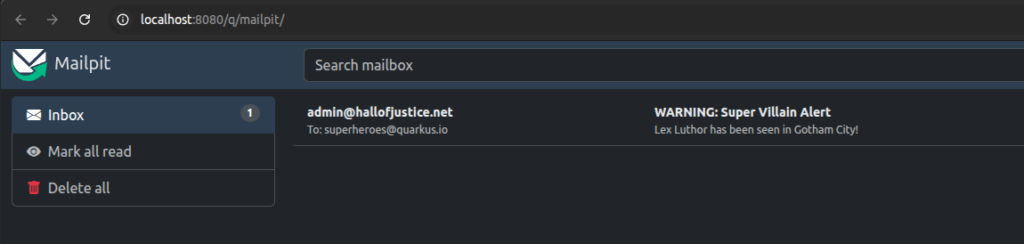
When making the following request, the email is sent as a simulation.
curl -X 'GET' \
  'http://localhost:8080/api/v1/superheroes' \
  -H 'accept: text/plain'
It is possible to see how the email would be received.
So far, we have only performed a simulation, but we can send real emails using popular email delivery services such as Gmail SMTP, AWS SES (Simple Email Service), SendGrid, and others.
To send real emails, we need to specify some properties in the application.properties file, filling them with the values of the chosen email service.
quarkus.mailer.auth-methods=DIGEST-MD5 CRAM-SHA256 CRAM-SHA1 CRAM-MD5 PLAIN LOGIN
quarkus.mailer.from=YOUREMAIL@gmail.com
quarkus.mailer.host=smtp.gmail.com
quarkus.mailer.port=465
quarkus.mailer.tls=true
quarkus.mailer.username=YOUREMAIL@gmail.com
quarkus.mailer.password=YOURGENERATEDAPPLICATIONPASSWORD

quarkus.mailer.mock=false # In dev mode, prevent from using the mock SMTP server
If you want to use the Gmail SMTP server, first create a dedicated password in Google Account > Security > App passwords or go to https://myaccount.google.com/apppasswords.
Then, you can define the app name and generate a password. This password can be used in the password property, and you should fill in the from and username fields with your email.
After running the API again and sending an email, it will no longer be a simulation — a real email will be sent.
Do not forget to update the Mail object to send the email to a valid address and set the from field to the same email configured in the properties.
Mail m = new Mail();
        m.setFrom("admin@hallofjustice.net");
        m.setTo(List.of("superheroes@quarkus.io"));
        m.setText("Lex Luthor has been seen in Gotham City!");
        m.setSubject("WARNING: Super Villain Alert");
        mailer.send(m);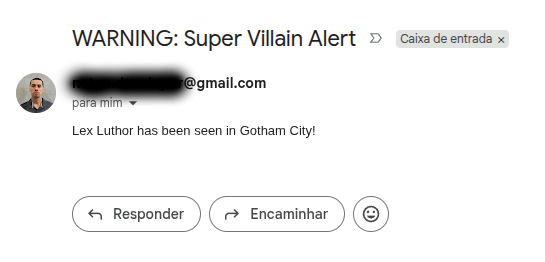
Conclusion
Quarkus makes email integration straightforward by providing both a local simulation environment with Mailpit and seamless integration with real email providers. This approach allows developers to test email functionality safely during development and easily switch to real email delivery in production. As a result, it improves development efficiency while ensuring a reliable and scalable email solution.